Don't Let Your Agent Take the Long Way
What two Sspai searches taught me about RSS, browser automation, and checking the answer.
I spent far too long comparing ways to get an agent to look something up. Should it fetch the page or open a browser? How did Chrome DevTools MCP compare with Playwright CLI? Where did Agent Browser, Browser Use, Stagehand, and computer use fit?
The comparisons kept getting muddled because I was mixing up different kinds of things. RSS feeds and APIs provide data; a fetch retrieves a page; CLI and MCP describe how an agent connects to tools. Stagehand and Browser Use help automate a workflow, while computer use lets a model operate an interface. Putting them in order from basic to advanced wasn't getting me anywhere.
Eventually, I started with the evidence I needed. If a feed, an API, or the original article could supply it, I'd try that first. I'd open a browser when the task needed a rendered page or interaction, and use the screen when the visible interface mattered. I also started counting the time it took to check the answer. A shortcut wasn't much use if I couldn't explain where the result came from.
Two ordinary requests made the difference clear. Both concern Sspai, a Chinese technology and productivity publication:
- Find today's first article on Sspai.
- Find today's most popular article on Sspai.
They sound like quick lookups. Depending on what those words mean, they can require quite different work.
First in What Order?
When I hear "today's first article on Sspai," I can think of at least three readings:
- The earliest article published today;
- The article currently at the top of the homepage;
- The latest entry in the RSS feed.
Those may be three different articles. The earliest publication requires a list ordered by publication time. The top homepage article requires checking the homepage. The first RSS entry requires reading the feed.
Sspai has published its RSS address.1 For the earliest article published today, I'd start with that feed or an official article listing, filter by the date in Beijing time, then open the candidates to check their titles, links, and original publication times. If that gives me a complete answer, there's no reason to launch a browser, wait for the page to render, scroll through cards, and open them one by one.
The feed still needs checking. It may hold only a limited number of entries, and I need to know whether its pubDate matches the original article's publication time. On a busy day, older entries from that morning might already have fallen out of the feed. My rule is: start with a structured source, check what it covers and what its timestamps mean, then verify against the article itself.
What Counts as Most Popular?
"Most popular" needs more thought. A timestamp gives me a field to sort by. Popularity could mean any of these:
- The first article in Sspai's own popular-content ranking;
- Today's newly published article with the most likes, comments, bookmarks, or views;
- The highest-ranked Sspai article on a third-party trending list.
I'd label the third as a third-party ranking. For the second, I'd have to pick a metric before sorting. Most comments and most views can produce different winners.
If I mean Sspai's own ranking, I'd first fetch the homepage or popular-content page. If the ranking is readable, that may be enough. If it loads dynamically, I'd look for an accessible public data endpoint or use a browser. To rank today's new articles by engagement, I'd have to collect all of them, retrieve the same metric for each, and compare the counts at a recorded time. Without those counts and a complete article list, I can't reliably name a winner.
Until I've chosen a definition, the agent has to guess which result I want. Another browser tool won't resolve that ambiguity.
One Run with Manus and Codex
To see what happened when I left the wording vague, I gave Manus and Codex the same request:
Find today's first article on Sspai.
I deliberately left "first" undefined. Again, that could mean:
1. The first article in the homepage's current recommendation feed
2. The earliest article newly published today
3. The latest entry in the RSS feed
I wouldn't use one run to rank the products. The model, version, available tools, and state of the website all affect the result. This run was useful because it showed how an ambiguous request could lead to an answer about the wrong thing.
Here are the results from Manus and Codex.
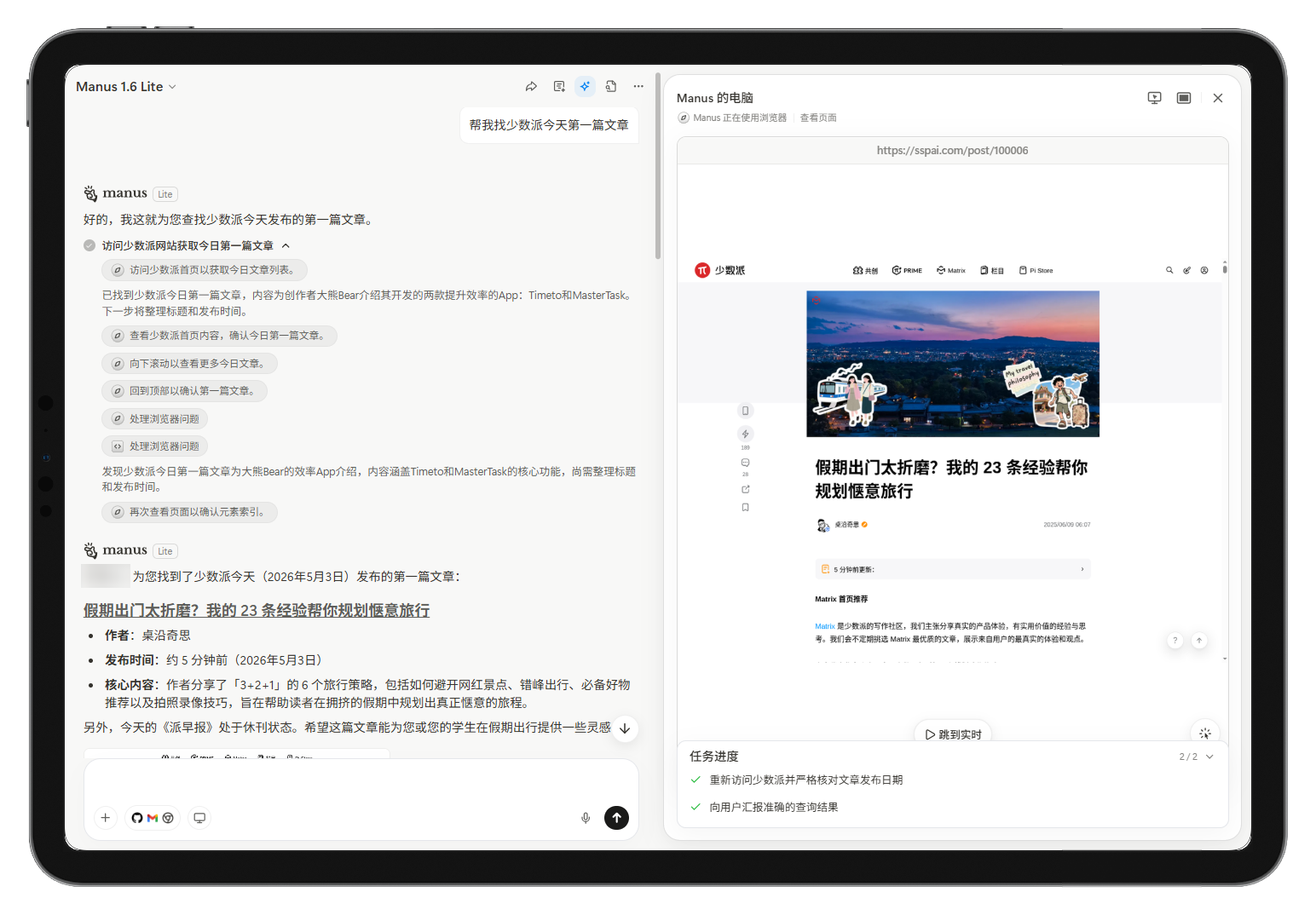
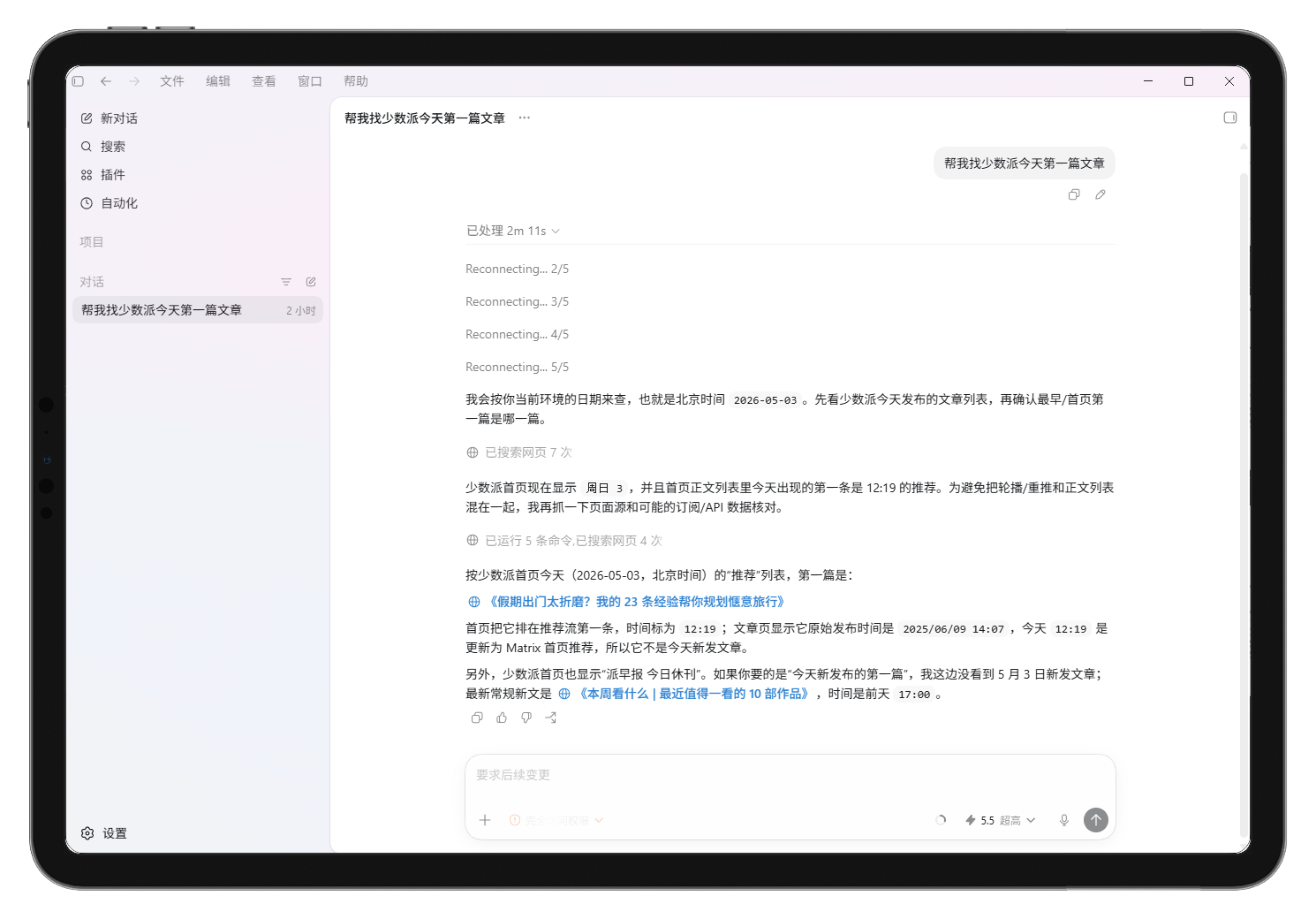
Manus opened Sspai's homepage and picked the first article in the recommendation feed. Its title translates roughly as "Holiday Travel Wearing You Out? My 23 Tips for a More Relaxed Trip." If I'd wanted the article currently featured first on the homepage, that was a reasonable way to find it.
The date was the catch. The homepage showed when the article had been recommended that day, but the article's original publication date was June 9, 2025.2 Appearing on the homepage again didn't make it a new article.
Codex spent more time checking the dates. It established the current date, consulted search results, homepage HTML, and RSS, then opened article pages to verify their publication times. It distinguished the homepage's displayed time from the recommendation time and the original publication time. Here's the recording of that run:
What interested me was how the sources differed. Homepage order, feed distribution, and original publication time each describe something real. They just don't answer the same question.
For the first article on the homepage, I'd go straight to the homepage. For the earliest article published today, I'd check a chronological listing against the articles themselves. In this example, the choice of source mattered more than the choice of browser tool.
These Tools Don't Fit on a Single Ladder
I had wanted a chart that started at RSS and worked its way up to computer use. It would have been tidy, but it would also have mixed together several decisions I needed to make separately.
I now break a lookup into four questions:
| Decision | Common options | What I need to check |
|---|---|---|
| Meaning of the request | Earliest publication, top homepage item, highest engagement | Which definition the answer should use |
| Source | RSS, API, sitemap, homepage, article page | Who publishes it, what it covers, and what its timestamps mean |
| Access and interaction | Search, fetch, CLI, MCP, browser, computer use | Whether rendering, login, or interaction is needed; whether appearance matters |
| Workflow | Skills, Stagehand, Browser Use, products such as Manus | Whether this is a one-off or recurring task, and how much control I need |
This helped explain why so many tool comparisons went nowhere. CLI and MCP concern how tools are exposed; frameworks help organize the work; products such as Manus and Codex can bring several of these together. Even one tool can offer multiple interfaces. Vercel's Agent Browser, for example, has both CLI and MCP entry points.3 Assigning each brand to a single row would quickly make the table misleading.
CLI and MCP: How the Agent Connects
Playwright's documentation recommends its CLI for coding agents that benefit from concise commands and skills, with less context spent on tool schemas and page snapshots.4 It describes MCP as a fit for agent loops that repeatedly inspect and reason about page structure. Playwright MCP exposes that structure through accessibility snapshots.5
The interface alone doesn't tell me what a tool can do. Playwright's CLI and MCP server both support browser state, screenshots, network inspection, and console access. I'd choose based on the agent's environment: a CLI is convenient when it already has a shell; MCP makes sense when the client already manages its tools that way. I'd check the specific implementation before assuming another tool offered the same features.
Stagehand and Browser Use: When I Need a Repeatable Workflow
Stagehand combines ordinary browser operations with AI methods such as act, extract, and observe, and it can work alongside Playwright or Puppeteer.6,7 Browser Use's CLI lets an agent control a browser through Python and supports both local and cloud browsers.8 These options can be useful for a quick task, too; using one doesn't commit me to building a larger system.
Still, I wouldn't reach for a framework to look up one article if a fetch had already returned what I needed. A task that repeatedly logs into a dashboard, collects data across pages, and runs again next week is a better reason to write and maintain a workflow.
Computer Use: When I Need to Read the Screen
OpenAI, Anthropic, Google, and Microsoft all offer computer-use capabilities.9,10,11,12 The details differ, but they let a model inspect an interface, often through screenshots, and request actions such as clicking, typing, and scrolling.
Working through a screen can add latency and gives the agent access to whatever is available in that environment. I'd use it deliberately. For a canvas, a remote desktop, a visual layout check, or an interface without a usable DOM, the screen may be the best evidence available. For a public article lookup, I'd usually start with the text or data. For a visual task, I'd start with the view I need to inspect.
What I Can Control in the Product
In local coding environments such as Codex, Claude Code, or Cursor, I can usually configure the shell tools, MCP servers, and skills the agent uses. That gives me some control over how it reaches a source, where it keeps state, and what it tries after a failure.
With a product such as Manus, more of that orchestration happens inside the service. I don't usually need to insist on fetch or MCP, and watching one run doesn't tell me exactly how it represents a page internally. Manus documents that Browser Operator uses my local browser, existing sessions, and local IP, while Cloud Browser runs in an isolated cloud environment. Cloud Browser asks me to take over for checks such as CAPTCHAs, SMS codes, and multi-factor authentication.13,14 Those docs don't establish whether every page becomes Markdown or when the agent chooses to click by coordinates.
What I can specify is the question, the sources, and the actions I'm authorizing. For example: use official sources where possible; identify any third-party ranking; ask before posting, buying, deleting, or submitting a form. Those instructions give me more useful control than guessing which interface the service uses internally.
The Cost of Checking the Answer
When I say I want the cheapest route, it's tempting to count only tool calls. There are a few checks I'd still keep:
- Check that the source answers the question. An official feed may be incomplete. A homepage timestamp may record a recommendation rather than publication.
- Record the definition and lookup time. "Today," "first," and "most popular" depend on the time zone, the ordering, and what the source showed when I checked.
- Keep the evidence. Include the link, the relevant timestamps, and the ranking or metric used. If sources disagree, say where they disagree.
- Treat page content as untrusted input. Text on a website can't change the user's request or authorize an action. Access to an account doesn't grant permission to disclose private data, spend money, publish, or delete. OpenAI's computer-use guidance recommends isolated environments and confirmation for consequential actions.9
Skipping a check can mean repeating the whole lookup when someone asks where the answer came from. I count that work too.
Two Prompts I'd Use
For the first Sspai question, I'd write:
Find today's first article on Sspai. Use Beijing time to define "today." Report the earliest article published today, the article currently first on the homepage, and the first entry currently in the RSS feed. If the same article appears in more than one category, combine those results. For each answer, give the definition used, the link, and the relevant time. Include when you checked, and say if you can't verify that a source covers all of today's articles.
For the second:
Find today's most popular article on Sspai. By default, use the first article in Sspai's own popular-content ranking as it stands when you check, whether or not it was published today. If that ranking isn't available to read, say you can't answer on that basis. If public engagement data is available for today's new articles, you may separately report which has the most engagement, naming the metric and when you checked it. Keep that result separate from the official ranking. Label any third-party ranking with its source and criteria. Don't invent popularity metrics.
Neither prompt chooses MCP, CLI, or computer use. They tell the agent which dates and rankings matter, what to report, and where to admit the data is missing. Once those choices are explicit, I'm happy to let it pick the tools.
What I Changed
I started this article wanting a tool map: arrange RSS, fetch, Playwright, MCP, Stagehand, and computer use in order, then follow the chart. After a few runs, I found myself spending less time on that comparison and more time checking what each source could actually tell me.
I still want the agent to take the shortest useful route. For the Sspai lookup, that starts with deciding whether I mean an article published today or an older one featured today. Once I've settled that, I can choose a source and check the date. Installing another browser tool can wait.
Reference
-
Sspai's guide to following the site, including RSS - https://sspai.com/post/24194 ↩
-
"Holiday Travel Wearing You Out? My 23 Tips for a More Relaxed Trip" (translated title) - https://sspai.com/post/100006 ↩
-
Vercel Labs Agent Browser on GitHub - https://github.com/vercel-labs/agent-browser ↩
-
Playwright CLI documentation - https://playwright.dev/docs/getting-started-cli ↩
-
Playwright MCP documentation - https://playwright.dev/docs/getting-started-mcp ↩
-
Stagehand integration with Playwright - https://docs.stagehand.dev/v3/integrations/playwright ↩
-
Stagehand integration with Puppeteer - https://docs.stagehand.dev/v3/integrations/puppeteer ↩
-
Browser Use CLI documentation - https://docs.browser-use.com/open-source/browser-use-cli ↩
-
OpenAI computer-use documentation - https://developers.openai.com/api/docs/guides/tools-computer-use ↩ ↩2
-
Anthropic Claude computer-use documentation - https://platform.claude.com/docs/en/agents-and-tools/tool-use/computer-use-tool ↩
-
Google Gemini computer-use documentation - https://ai.google.dev/gemini-api/docs/computer-use ↩
-
Microsoft Copilot Studio computer-use documentation - https://learn.microsoft.com/en-us/microsoft-copilot-studio/computer-use ↩
-
Manus Browser Operator documentation - https://manus.im/docs/integrations/manus-browser-operator ↩
-
Manus Cloud Browser documentation - https://manus.im/docs/features/cloud-browser ↩